Home / Team email signatures
Teams

Email signature management for your whole team

SignTry makes email signature management simple: upload one spreadsheet and get a personal, on-brand company email signature for every person on your team in one click. Then manage, copy and track them all from one dashboard.

No credit card required

Why company email signatures need managing

Without a system, every employee designs their own signature. You end up with five versions of the logo, outdated job titles and phone numbers nobody answers. Consistent company email signatures make every email look like it comes from the same business, and they turn thousands of everyday emails into brand impressions.

Generate everyone's signature from a CSV

Design the signature once, then let the spreadsheet do the rest:

  1. Design once. Pick a template and set your logo, colors, banner and links.
  2. Choose “For my team” in the last step and download the CSV template.
  3. Fill in the spreadsheet in Excel, Google Sheets or Numbers: one row per person. Only the first name is required.
  4. Add photos (optional). Upload image files and put the file name in the photo column (for example jane.jpg), or paste an https link.
  5. Upload and review. SignTry shows every row with its email, title and photo status.
  6. Click Generate. Every signature is created at once, ready to copy.
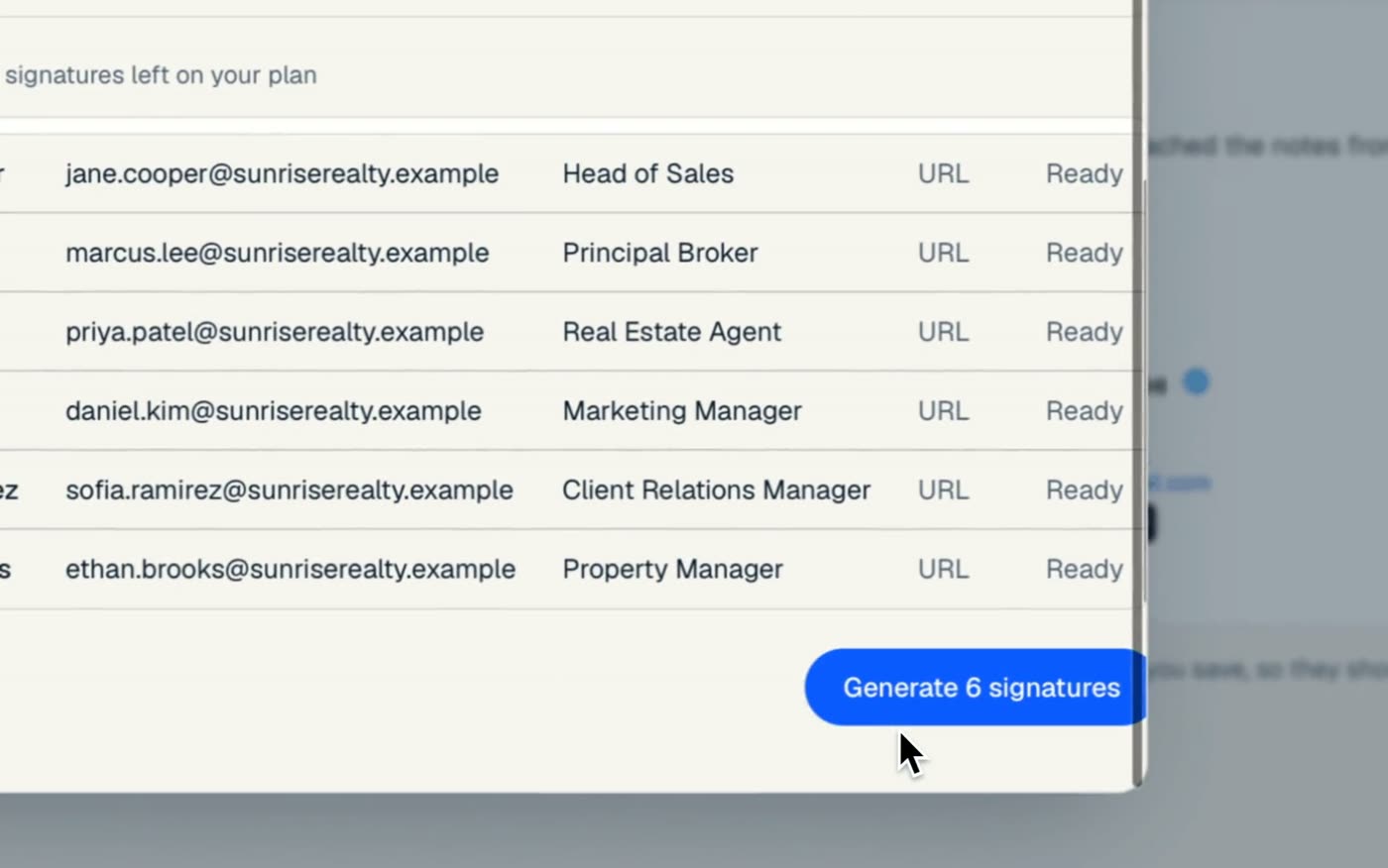
Six team members imported from a CSV, ready to generate email signatures
Reviewing the imported team before generating signatures.

Tip: start with a test file of two or three people to check the layout, then upload the full team.

Manage every signature in one library

Every signature you create lands in My signatures. Search by name, email or title, and for each person you can:

  • Copy the signature, ready to paste into Gmail, Outlook or Apple Mail.
  • Get the HTML code if you deploy signatures yourself.
  • See analytics for the links in that signature.
  • Delete signatures for people who leave.

Library of generated company email signatures with copy, code and analytics buttons
Every generated signature, ready to copy, export or track.

Google Workspace and Microsoft 365 teams

SignTry works for teams on Google Workspace, Microsoft 365 or a mix of both. Each signature is HTML made for email apps, with hosted images, so it looks the same whether a colleague uses Gmail, Outlook on Windows, Outlook on Mac or Apple Mail. Share each person's signature with them and they paste it in. Our Outlook guide and Gmail guide walk them through it.

Priced per signature, not per seat

Most email signature management platforms charge per user with a minimum number of seats. SignTry charges for the number of signatures you need, from 5 up to 250 and beyond, with every feature included. A 25-person team pays $22 a month on yearly billing. Compare plans.

Built for teams of every size

From a 5-person agency to a 250-agent brokerage.

CSV import

One row per person. Only the first name is required.

Photos from the CSV

Match file names or use photo URLs.

One brand

Template, colors, logo and banner set once for everyone.

Copy or export HTML

Paste into any email app or deploy it yourself.

Analytics per person

See which signatures and links get clicked.

No seat minimums

Pay for the signatures you need, nothing more.

Frequently asked questions

What is email signature management?

Email signature management means creating, updating and controlling the email signatures used across a company from one place, so every employee has a consistent, on-brand signature with correct details.

What should my CSV file contain?

One row per person. Only the first name is required. Add columns for last name, job title, email, phone and photo as needed. Download the CSV template inside SignTry to start with the right column names.

How do I add photos for everyone?

Either upload the photo files and put each file name (for example jane.jpg) in the photo column, or put an https link to the photo in that column. Rows without a photo still get a signature.

Does it work with Google Workspace and Microsoft 365?

Yes. Signatures are standard HTML with hosted images, so they work in Gmail, Outlook and Apple Mail for both Google Workspace and Microsoft 365 accounts.

How much does it cost for a team?

Team plans start at $7 a month for 5 signatures on yearly billing and go down to $0.60 per signature at 250. All features are included. See pricing.

Keep exploring

Give your whole team the same polished signature

Pick a template, add your details and copy it into your inbox. Free to start, no credit card required.

No credit card required